Another wave of concern has emerged within the PC gaming community regarding a Windows 11 update. Owners of NVIDIA graphics cards have begun widely reporting performance degradation and persistent stuttering after installing the KB5074109 patch. The discussion rapidly spread across social platforms, with users attempting to identify the cause of unstable game and system behavior.
Where the Information Originated
The catalyst for the debate was a warning issued by StinceBuilt, a team well known for PC and gaming system optimization. In their statement, they directly pointed to a problematic Windows update:
StinceBuilt:
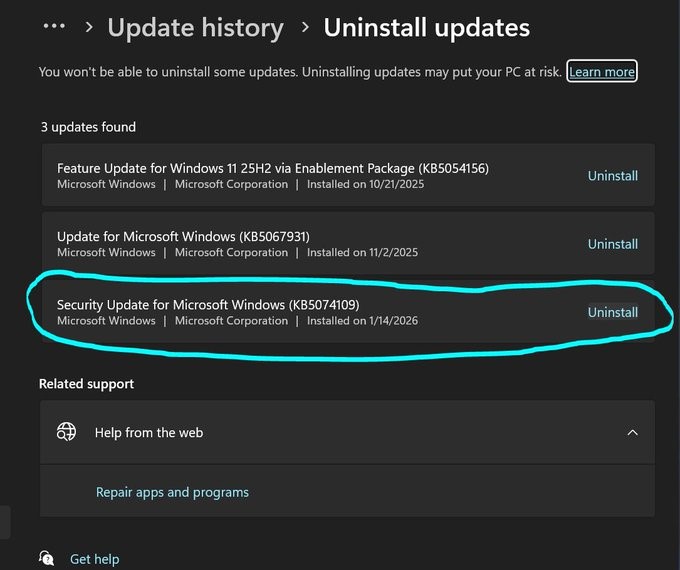
FPS warning. NVIDIA users on Windows 11 — the KB5074109 update is causing a 15–20% FPS loss and persistent stuttering. Roll it back as soon as possible.
Following this post, users began correlating their recent performance issues with the latest OS updates, further amplifying the discussion.
read more

What the Problem Looks Like
According to player reports, installing KB5074109 is associated with recognizable signs of performance regression. Users describe lower average FPS, inconsistent frame times, and micro-stutters that become especially noticeable during dynamic scenes. Importantly, these complaints are not tied to a single game but rather to overall system behavior, typically suggesting a deeper conflict at the driver or Windows component level.
Why This Situation Appears Unusual
Standard Windows updates rarely trigger such a synchronized response from gamers. In this case, reports of issues surfaced almost immediately after the update’s release, and the symptoms appeared consistent across different systems. Similar scenarios are often linked to modifications within the Windows graphics stack, task scheduling mechanisms, or GPU driver interactions, which may explain the scale of the effect.
Community Reaction
After warnings began circulating online, players actively shared their experiences. Some users confirmed significant FPS drops, while others questioned whether newer patches were affected:
Mine says KB5077181 and it was installed today. Any word on whether this one is better or worse?
The response from StinceBuilt did little to calm concerns:
StinceBuilt:
It is supposed to fix older issues. It’s still not perfect, but it is much better than before.
Alongside technical discussions, more emotional reactions predictably followed, with users criticizing Windows update stability and the risks of automatic installations.
Why NVIDIA Systems May Be More Affected
Although no official technical breakdown has been published, the logic behind similar incidents typically points to interactions between Windows updates and GPU drivers. Changes to GPU management, rendering pipelines, or display subsystems can potentially destabilize frame timing. If KB5074109 indeed introduced adjustments within these areas, NVIDIA users may have been among the first to experience side effects due to driver-specific implementation details.
Practical Impact on Gamers
For gaming systems, even moderate FPS reductions can have tangible consequences. Lower frame rates and stuttering directly affect smoothness, input latency, and overall responsiveness. In competitive environments, this can translate into reduced aiming stability and slower reactions, explaining the strong community response and widespread rollback recommendations.
Is There a Reason to Panic
Windows has a long history of similar incidents, many of which were resolved through subsequent patches. Nevertheless, the KB5074109 situation serves as another reminder that even routine system updates may produce unexpected performance side effects. For users of high-performance PCs, this underscores the importance of monitoring system behavior after updates and considering temporary rollbacks when necessary.
read more
Minor Regressions, Major Discussions
The debate surrounding KB5074109 illustrates how sensitive gaming performance remains to Windows-level changes. Even minor regressions are capable of generating significant community attention, particularly among gamers and esports players. Under such conditions, configuration stability and cautious update management continue to be essential factors for maintaining consistent FPS.