
In Counter-Strike 2, float values affect a skin’s look, wear tier, and market price. A skin’s float value is assigned when the item drops or is unboxed, and it doesn’t change over time. For traders, collectors, and regular players, CS2 float values are one of the main factors behind price differences between skins. The float range of a finish also affects which wear ratings a skin can reach. In some cases, two versions of the same skin can differ in price by hundreds or even thousands of dollars.
What is Float Value in CS2?
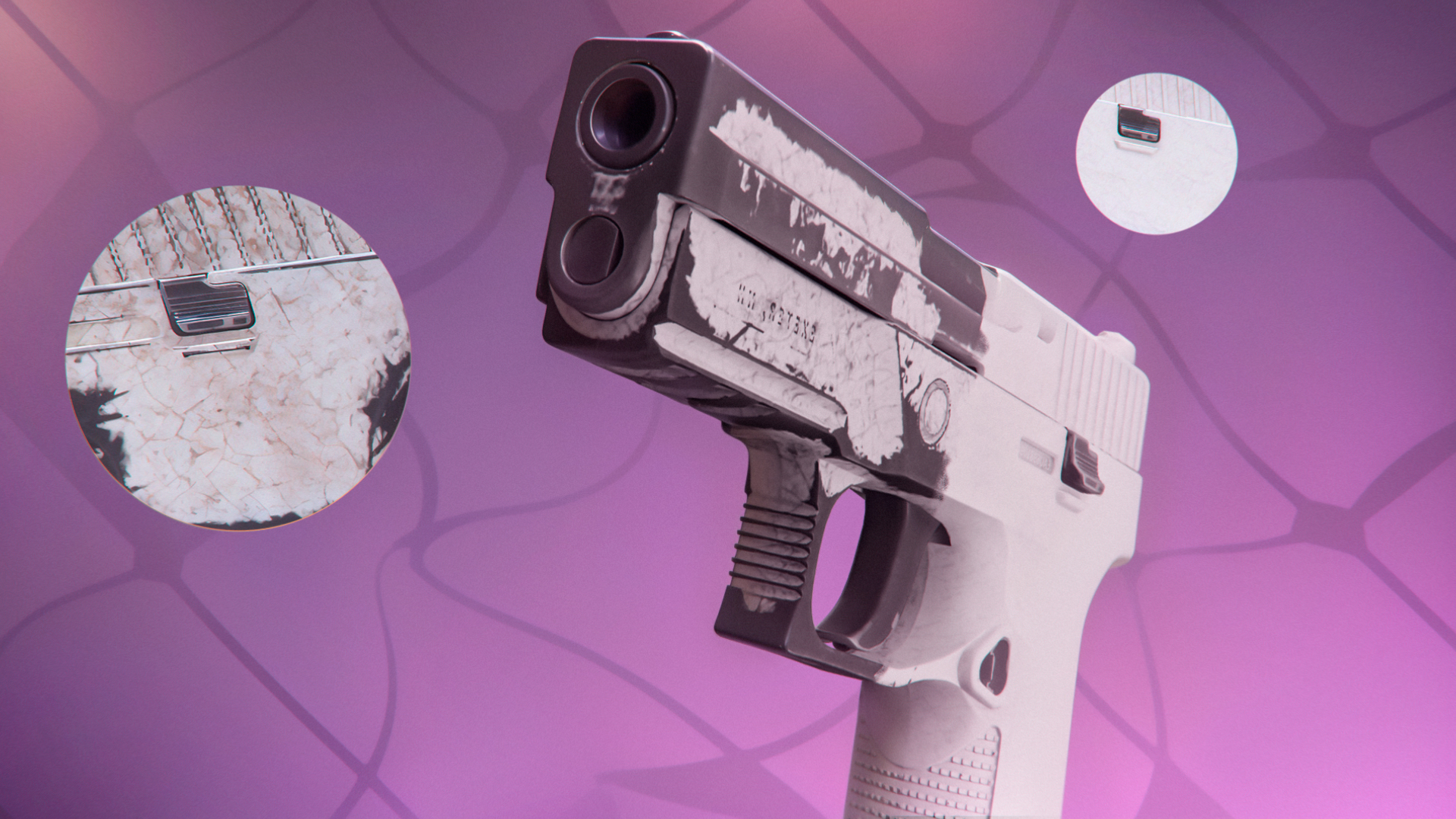
Float is a number from 0.00 to 1.00 that indicates a skin’s wear in Counter-Strike 2. It’s assigned when a skin is created and doesn’t change afterward. Players can see it in the inspect view. Lower-float skins look cleaner, while higher-float skins show more visible wear. New skins can enter the game through several systems, and the float is set as soon as that specific item appears:
- Weekly drop: Rewards from the Weekly Care Package
- Case opening: Skins from cases or from Terminals
- Trade-up contract: A new skin created from 10 input items
- The Armory Pass: Skins claimed through Armory credits
- Souvenir packages: Skins from souvenir drops tied to major events
Float affects visuals only. A Battle-Scarred skin has the same in-game performance as the Factory New version of the same weapon skin. Playing with a skin, trading it, selling it, or applying stickers doesn’t change its float. Float applies to weapon skins, knives, and gloves. It doesn’t apply to stickers, graffiti, agents, or patches.
CS2 Wear Rating and Float Ranges
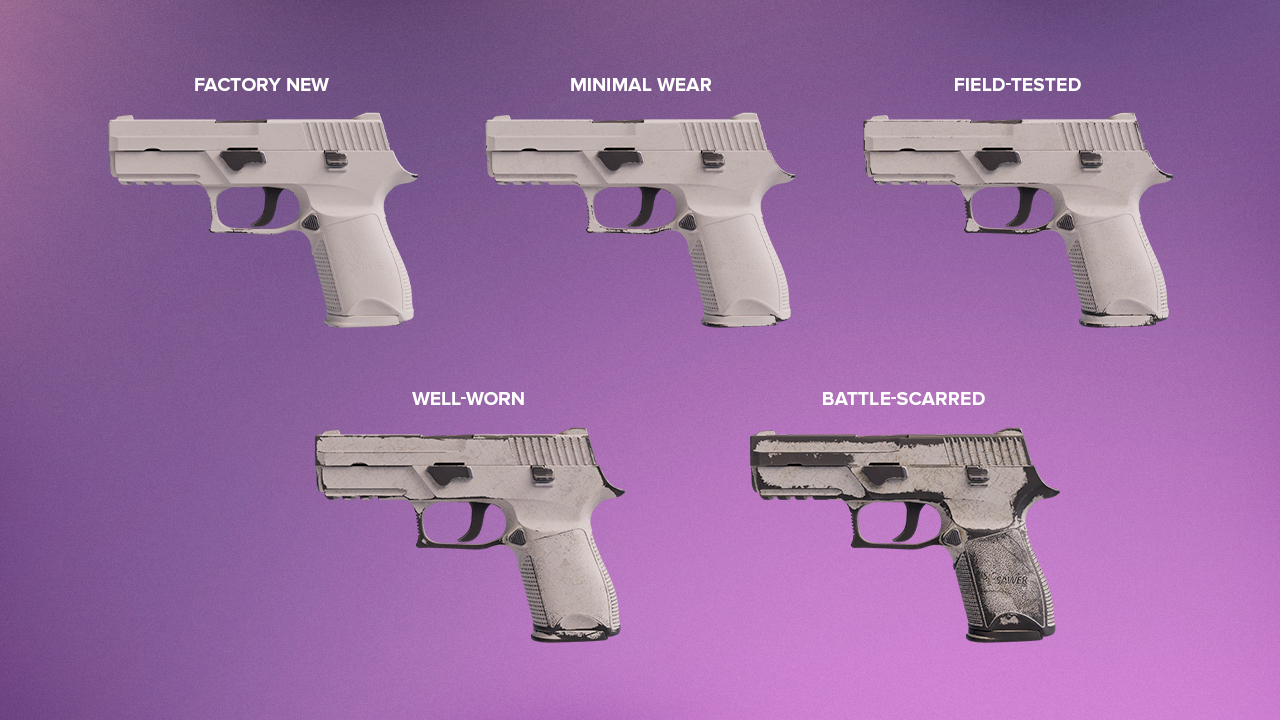
CS2 wear is split into five standard tiers, and each tier matches a fixed float range that shows how clean or worn a skin looks:
Condition | Float Range | Description |
|---|---|---|
Factory New (FN) |
0.00 – 0.07 |
Clean finish with almost no visible wear |
Minimal Wear (MW) |
0.07 – 0.15 |
Light wear with small marks on the finish |
Field-Tested (FT) |
0.15 – 0.38 |
Noticeable wear that depends on the skin |
Well-Worn (WW) |
0.38 – 0.45 |
Heavy wear with clear scratches and fading |
Battle-Scarred (BS) |
0.45 – 1.00 |
Maximum wear with dark marks and rough finish |
Factory New Float Range
Factory New covers 0.00 to 0.07. This is the cleanest standard wear tier in Counter-Strike 2, and lower float values inside FN can raise the price by thousands of dollars. A good example is Karambit | Doppler Sapphire. A 0.03 version with a damaged corner can cost around $15,000. A 0.01 version with a cleaner corner can reach around $22,000. A 0.007 version with a Pixel Corner can sell for $30,000+. Even inside one wear tier, a small float difference can create a very large price gap.
Minimal Wear Float Range
Minimal Wear covers 0.07 to 0.15. This tier keeps most of the clean look of Factory New and usually costs much less. AK-47 | Fire Serpent is a clear case. A 0.14 MW version can cost around $1,100 and already looks close to Field-Tested. A 0.08 MW version can reach around $1,800 and looks much closer to Factory New. Players often choose this range because it keeps most of the visual quality while saving thousands of dollars compared to FN Fire Serpent, which starts at around $4,500.
Field-Tested Float Range
Field-Tested covers 0.15 to 0.38. This is the first range where wear becomes clearly visible, though it doesn’t look the same on every finish. On some skins, the difference stays minor, while on lighter finishes it stands out much more. FT is a common everyday choice because it still looks solid in game and usually costs much less than cleaner tiers.
Well-Worn Float Range
Well-Worn covers 0.38 to 0.45. Wear is clearly visible in this range, and the finish looks much more faded than in Field-Tested. M4A1-S | Night Terror fits this tier well. In Well-Worn, the red background fades, so the face becomes more visible and looks more creepy than on cleaner versions of the skin. The higher contrast makes the design stand out more clearly, which is why this finish looks more expressive in WW than in FN or MW.
Battle-Scarred Float Range
Battle-Scarred covers 0.45 to 1.00. This is the highest wear tier, with heavy scratches, dark marks, and clear surface damage. It’s usually the cheapest version of a skin, though very high floats near 1.00 also form a separate collector niche. Glock-18 | Bunsen Burner shows this well. In Battle-Scarred, especially closer to 1.00, the blue finish fades and shifts toward green or yellow. The skin doesn’t just look more worn. Its flame effect also looks noticeably different from cleaner versions.
Float-Capped Skins
Not every skin in Counter-Strike 2 can exist across the full 0.00 to 1.00 float scale. Valve sets a minimum and maximum float for each finish, and those limits decide which wear tiers are available. If the maximum float is low, the skin can’t reach the higher wear categories. Karambit | Doppler has a float range of 0.00 to 0.08, so it exists in Factory New and only at the very start of Minimal Wear. It can’t appear in Field-Tested, Well-Worn, or Battle-Scarred. Another example is Specialist Gloves | Crimson Web, which ranges from 0.06 to 0.80.
Extreme Floats
Extreme floats form a separate collector category in Counter-Strike 2. On the low end, Factory New skins in the 0.000x to 0.001x range can get a major premium because their float is close to the cleanest possible value. These skins are rare as very few copies are created with numbers that low. M4A1-S | Knight is one of the clearest examples. It is used in trade-up contracts for AWP | Dragon Lore, so buyers pay extra for ultra low float copies to reduce the output float as much as possible. In this case, the value comes from two things at once. The skin is rare as a low-float collectible, and it also has practical value in high-end trade-up contracts.
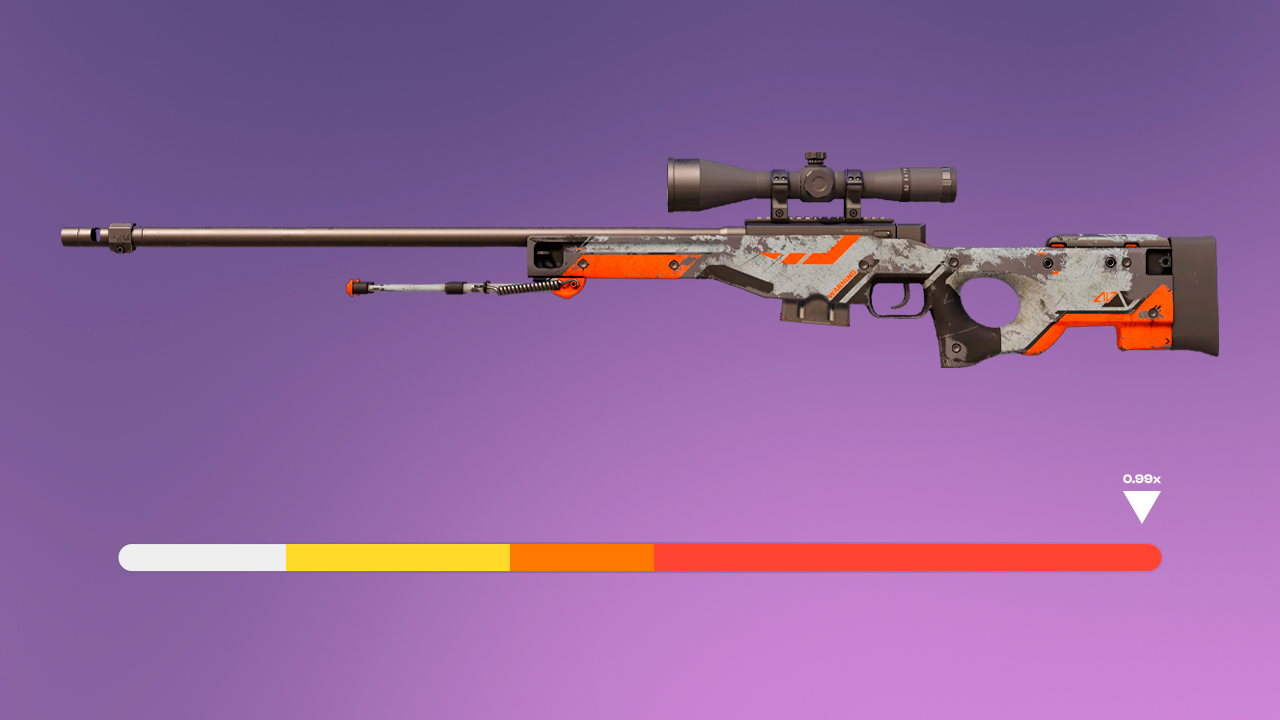
On the high end, Battle-Scarred skins in the 0.99x range can also get collector interest. AWP | Asiimov is the best-known example. At very high float, the white paint on the scope wears away and the scope becomes almost fully black. This version is known as the Blackiimov. It is not just a normal Battle-Scarred Asiimov with heavier wear. The extreme float changes the most visible detail of the skin and creates a separate named version inside the CS2 market. Collectors usually pay more for copies where the black scope is clearly visible, especially when the float is close to the top of the allowed range. The value comes from the rare float number, the black scope and the fact that CS2 collectors treat Blackiimov as its own version of AWP | Asiimov.
How to Check Float Value in CS2
In-Game Inspection
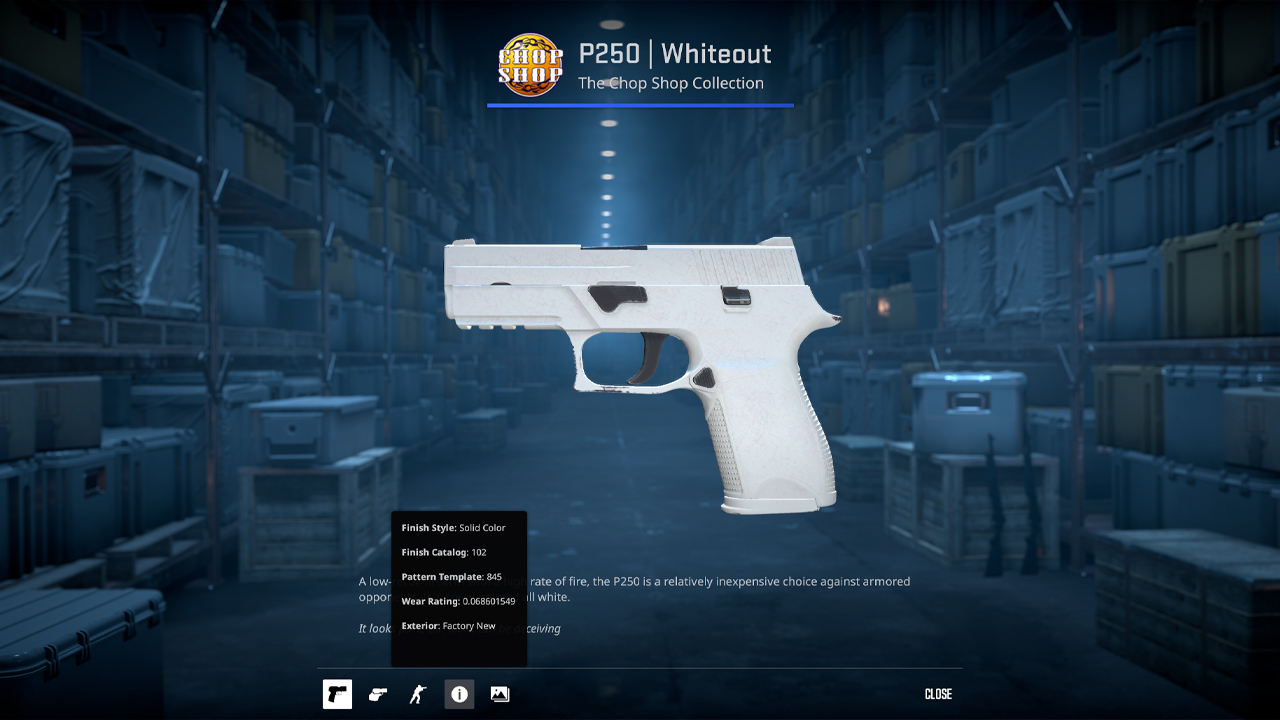
Open your CS2 inventory and select the skin you want to check. Right-click the item and choose Inspect. In the inspect window, click the i icon to open the item details. The float value appears there as the Wear Rating. This method works for skins you already own.
Steam Inventory
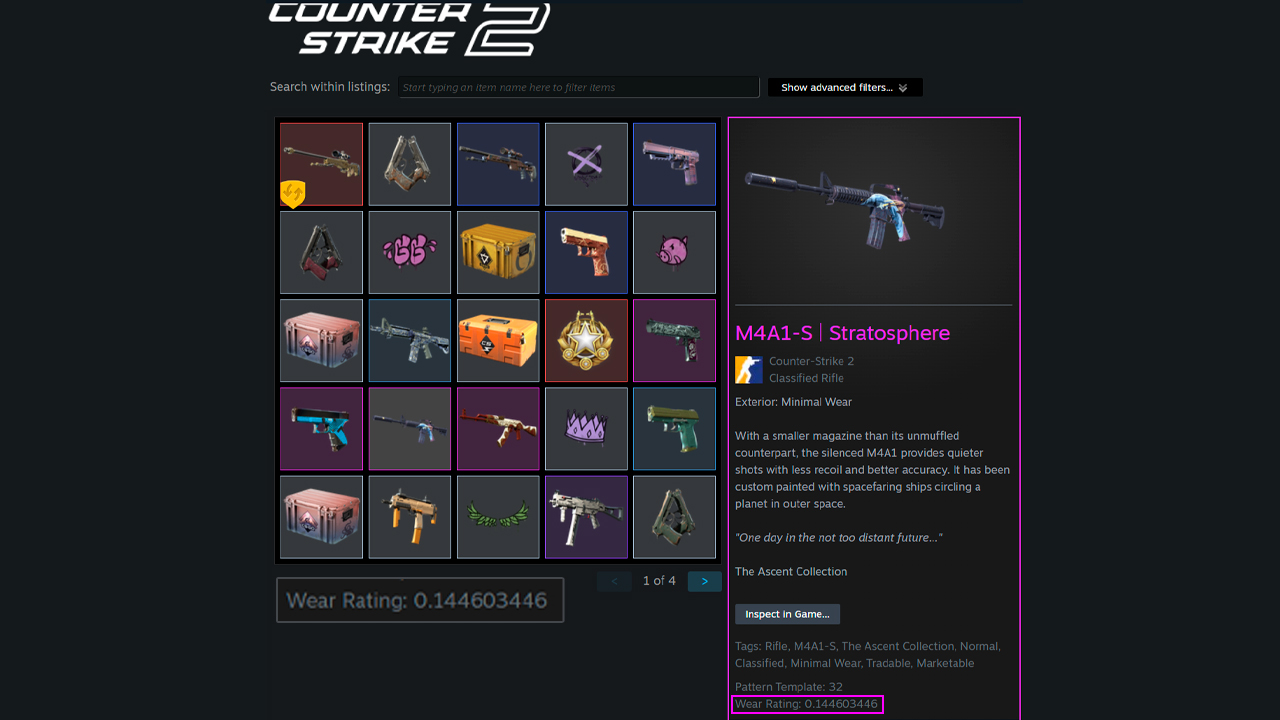
- Open Steam and go to your inventory.
- Click the weapon skin you want to check.
- Open the item details panel for that skin.
- Scroll down in the item info.
- Find Wear Rating. That value is the skin’s float.
Via Inspect Link
- Open the skin listing on the Steam Market.
- Right-click Inspect in Game and copy the link address.
- Copy the full inspect link that starts with steam://run/730/…
- Paste that link into a service like CSFloat.
- Check the exact float value shown for that item.
- Review extra details if needed, including stickers, pattern data, and other item info.
You may also be interested in our guide on how to inspect a skin in CS2. Get more out of gaming in 2026 with expert advice and effective techniques.
Buying Tips: When Float Matters
The general rule is simple. Pay for float only when it gives a visual advantage that the market clearly rewards. In most cases, that means paying extra only in two situations. The first is when the skin uses a Painted finish and scratches are easy to notice, as with a Karambit corner or a Printstream body. The second is when the item sits right at the edge of a wear tier, such as a 0.07 Minimal Wear skin that can give you a near Factory New look for much less money. If the finish mostly gets darker or changes tint without strong scratch damage, as with Patina or Gunsmith finishes, paying extra for a lower float is usually not worth it because the visual difference is small.
- When it matters: Items with capped float ranges, such as Shadow Daggers | Doppler or Glock-18 | High Beam with a 0.00 to 0.08 range. In these cases, Minimal Wear can be rarer than Factory New, which changes the usual pricing logic.
- When it doesn’t: Skins such as M4A1-S | Black Lotus or AWP | Black Nile. On these finishes, wear mostly shifts the color toward warmer purple or darker brown, and many players even prefer the more worn look over the cleaner version.
- The exception: Gloves are often different because float isn’t always the main factor. Scratch placement can matter more. A pair with a slightly higher float and cleaner knuckles can be worth more than a lower float pair with visible damage in the most important areas.
Inside the Float System
CS2 float values and wear ratings are core parts of skin pricing and item evaluation. Float defines how clean or worn a skin looks, which wear tiers it can reach, and in some cases how much it costs on the market. That matters for standard purchases, trade-ups, capped finishes, and extreme float items. Low float copies can get a strong premium, while some high float skins also have collector demand because of rare visual changes. Float check tools, inspect links, and Steam item details make this data easy to verify before a purchase, sale, or trade. In CS2, float isn’t optional market data. It’s part of the item itself.
FAQ
-
What is a good float value in CS2?
For most skins, a good float value is 0.00 to 0.07, which falls into Factory New.
-
Does float change over time in CS2?
No. Float is assigned when the skin is created, and it doesn’t change after that.
-
What items don't have float value in CS2?
Stickers, graffiti, agents, and patches don’t have float value in CS2.
-
Does float affect gameplay?
No. Float only affects the skin’s appearance.
-
What is the rarest float in CS2?
The rarest float values are the extreme ends of the scale, usually below 0.001 and above 0.999.
-
Is CS:GO float the same as CS2 float?
Yes, CS:GO float and CS2 float use the same underlying system. Every skin keeps its original float value after moving to CS2. However, due to updated graphics and lighting, some float levels may look slightly different in CS2 compared to CS:GO.



![Desert Eagle Heat Treated CS2 Guide & Patterns [2026]](https://community.skin.club/wp-content/uploads/2024/10/Main-x-Name-9-768x432.jpg)
![How to Get a Service Medal in CS2: Full Guide [2026]](https://community.skin.club/wp-content/uploads/2024/10/Main-x-Name-5-768x432.jpg)
![Recoil Control in CS2: Explanation and Tips [2026]](https://community.skin.club/wp-content/uploads/2024/10/Main-768x432.jpg)